
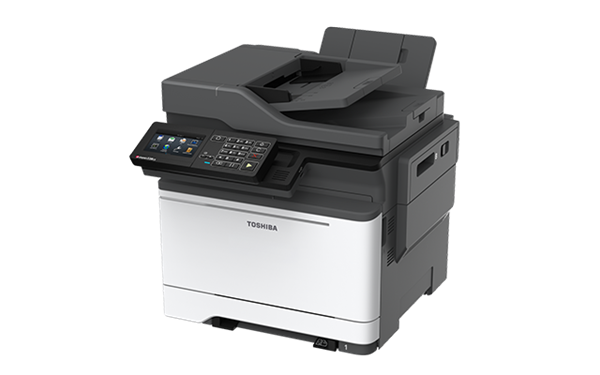
Choosing between office printers in Perth is less about spec sheets than most people expect. Two devices with near identical brochures can cost very different amounts to run over four years, depending on how they are supplied, serviced and charged for.
The businesses that end up happy tend to get three things right. They size the device to what they actually print, they understand who fixes it when it fails, and they read the parts of the agreement that deal with volume and end of term. Below we work through each of those, with the questions worth asking any Perth supplier before you sign.
What Size Printer Does Your Office Actually Need?
Start with real numbers rather than an estimate. Most modern devices report a page count, and your current supplier can usually tell you your monthly volume and the colour to black and white split. Reading the meter at two points in time and subtracting gives you an accurate monthly figure. It is also worth checking the device’s recommended monthly volume, which is lower than the headline duty cycle figure and reflects what the machine is built to handle day after day.
Matching volume to device class
| Team size | Typical monthly volume | Usually suits | Watch out for |
| 1 to 5 people | Under 1,000 pages | A desktop A4 multifunction device | Consumable costs on very cheap units, which push up the price of every page |
| 5 to 20 people | 1,000 to 5,000 pages | A workgroup A4 or entry A3 multifunction device | Paper tray capacity and refill frequency |
| 20 to 50 people | 5,000 to 15,000 pages | A floor-standing A3 multifunction device | Scanning speed if you digitise records |
| 50 or more | 15,000 pages and above | One or more high-volume devices, sometimes with a smaller backup unit | Single point of failure if everything runs through one machine |
Larger office devices almost always cost less per page than small desktop units, because their toner and consumables are designed for much higher yields. Published guidance on office printer running costs puts typical black and white office printing at roughly one to two cents per page, while small desktop devices commonly run well above that. For the same reason, laser devices generally beat inkjet on cost per page for everyday document printing.
Do you really need A3?
A3 devices cost more and take up more room, and plenty of offices never print larger than A4. They earn their place where you produce plans, posters, menus or booklets, or where the heavier build handles a high monthly volume more comfortably. Our guide to A3 versus A4 printers walks through the trade-off, and how big office printers should be covers sizing in more detail.
Should You Buy, Lease or Rent?
All three are valid. The right answer depends on your cash position, how long you expect to keep the device and how much of the maintenance risk you want to carry yourself.
The three common structures
- Buy outright. Often the lower total cost if the device lasts and you have a plan for servicing, although that depends on volume, term length and what a service agreement would have included. You carry the repair risk and the cost of consumables.
- Lease or rent with service included. A predictable monthly cost covering the device, maintenance and usually toner. You pay a premium for someone else carrying the risk.
- Own the hardware, pay per page for support. A middle path where you buy the machine and pay an agreed rate per page that covers toner, servicing and repairs.
That third option is worth asking about even when a supplier leads with a rental quote. Our breakdown of office printer leasing costs in Australia gives a sense of the numbers involved.
The question that decides it
Ask who will fix the device on a Friday afternoon when a major job is due. If the honest answer is an internal staff member who has other work to do, a service agreement usually pays for itself. Businesses that buy to save money often find the saving disappears the first time printing stops during a deadline.
How Do You Work Out the Real Cost?
Monthly figures hide a lot. Multiply the monthly amount by the full term, then add expected overage charges, consumables you buy separately and any end-of-term costs.
What to pin down before signing
- How many pages are included each month, in colour and in black and white
- The overage rate once you exceed those pages, which is usually higher
- Whether toner, parts, labour and call-outs are all included
- Whether the rate can rise during the term, and by how much
- What happens at the end of the term, including buyout figures and return conditions
Base the included volume on measured usage, not a guess. Once you know your real numbers, our tips on reducing office printing costs can bring the total down further. Setting double-sided printing as the default is the simplest saving available, with United States Environmental Protection Agency guidance reporting paper savings of around 30 to 50 percent, and print management software can enforce it across the office.
Why Local Service Matters More Than the Badge
Most current devices from established manufacturers are reliable. What differs is how quickly someone attends when one fails, and whether the parts are on the shelf in Perth or being freighted across the country.
Questions to ask a Perth supplier
- Where are your technicians based, and what is your typical response time in my area?
- Do you stock parts and toner locally?
- Do you service regional WA if we have sites outside Perth?
- Who do we call when something goes wrong, and what are the hours?
- Will you provide a loan device if ours is out of action?
Do not skip the security questions
Multifunction devices store documents on internal drives. Before any device leaves your office at the end of term, make sure the agreement covers wiping or destroying that drive. Cyber security guidance on disposing of electronic devices treats copiers and multifunction printers the same as any other equipment holding stored data. It is also worth asking about secure print release, where jobs are held until the right person authenticates at the machine, so confidential documents are not left sitting in output trays.
When Is It Time to Replace a Working Printer?
Age alone is not a reason to replace a device that still does the job. The usual triggers are rising repair frequency, parts becoming hard to source, and software compatibility falling away.
Signs worth acting on
- Scanning to email or cloud storage has stopped working after server or security updates, which happens when older devices cannot meet current authentication and encryption standards
- Repairs are becoming frequent enough to disrupt work
- Your volume has grown well beyond what the device was designed for
- Staff have started buying small desktop printers, which usually signals an access or reliability problem
If scanning and filing are the pain point, the fix may be workflow rather than hardware. Our document management solutions in Perth address that side of things.
What The Evidence Shows
Well established
- Higher-volume office devices cost less per page than small desktop printers, because their consumables are designed for far higher yields.
- Default double-sided printing cuts paper use substantially, and print management software makes the setting stick.
- Copiers and multifunction printers hold stored data, so their drives need wiping or destroying before disposal or return.
Depends on your situation
- Buying is often cheaper than leasing over the long run, but not always. Volume, term length and whether servicing is included can reverse the result.
- Cost per page figures vary widely by model and by whether toner is bought separately, so treat published ranges as a guide rather than a quote.
What To Do Next
Pull your last twelve months of page counts, note how many people print and what sizes you actually produce, then ask two or three suppliers to quote against those numbers. Comparing like for like is far easier than comparing brochures.
How Copyworld can help
Our multifunction printers and copiers in Perth come with servicing and maintenance built into the agreement, and smaller teams can start with our A4 office printers. If you are weighing up copying features specifically, our guide on how to choose an office photocopier is a useful companion.
Key Takeaways
Size the device to measure volume, not guesswork. Decide how much maintenance risk you want to carry, and price the full term rather than the monthly figure. Ask hard questions about local service, included pages, overage rates and what happens to your data at the end of the agreement. Get those right and the badge on the front matters far less than you would think.
